Skip to content

For farms that stand stallions

Run the breeding season from booking to breeder's certificate.

StallionDesk keeps the breeding season in one place: stud fees and bookings, contracts, collections, cooled and frozen shipments, registry paperwork, and private links for mare owners and vets.

Invite only. Three founders' farms before breeding season.

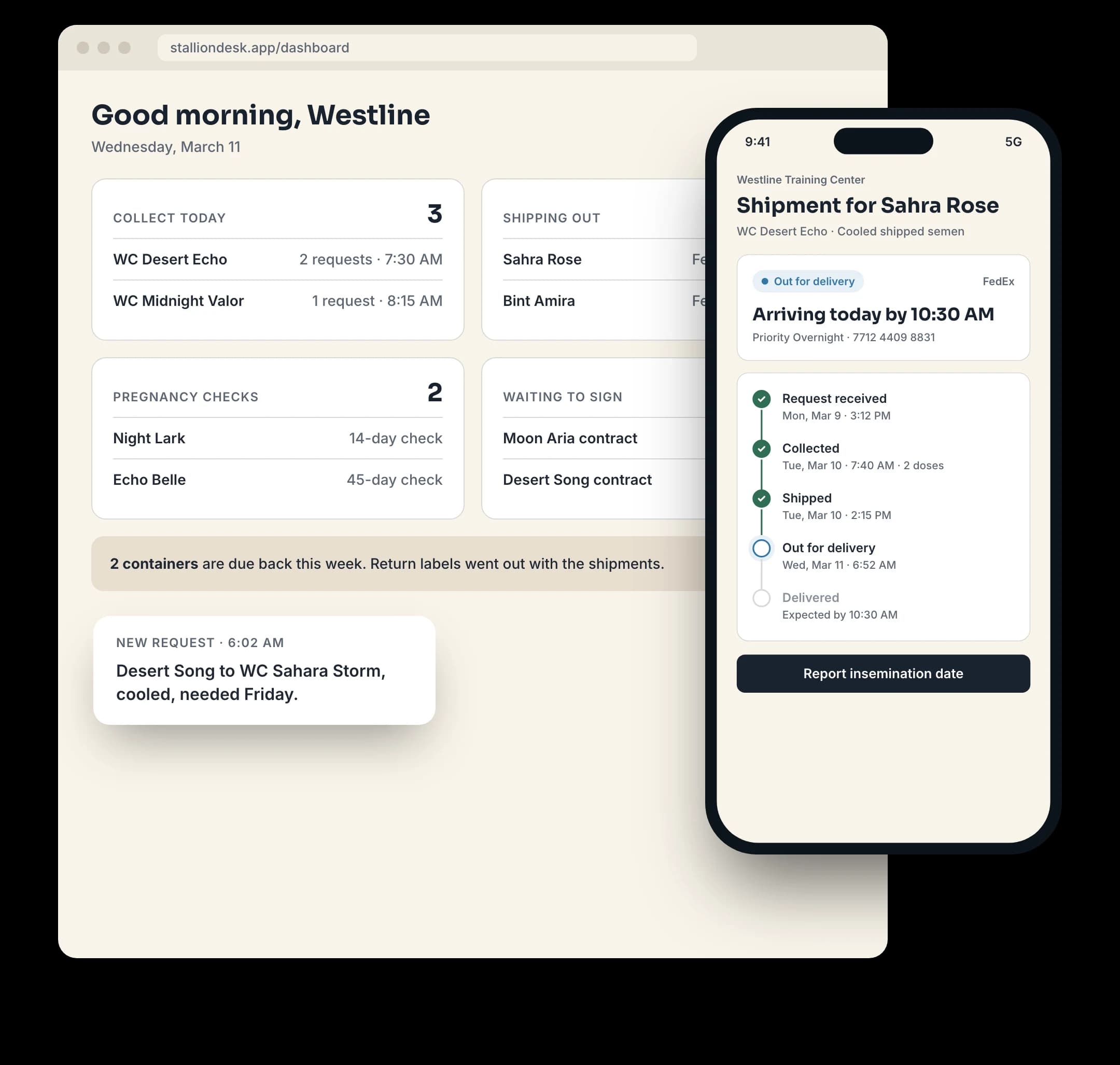
The Dashboard: blockers, open requests, shipments in transit and balance due

Every way you breed

  • Live cover
  • AI on site
  • Transported cooled
  • Transported frozen
  • Embryo transfer
  • ICSI

A breeding, start to finish

From the sale to the certificate.

Every breeding to your stallion follows the same path. Open one and it's all there: the contract, payments, collections and shipments, the pregnancy check and the certificates.

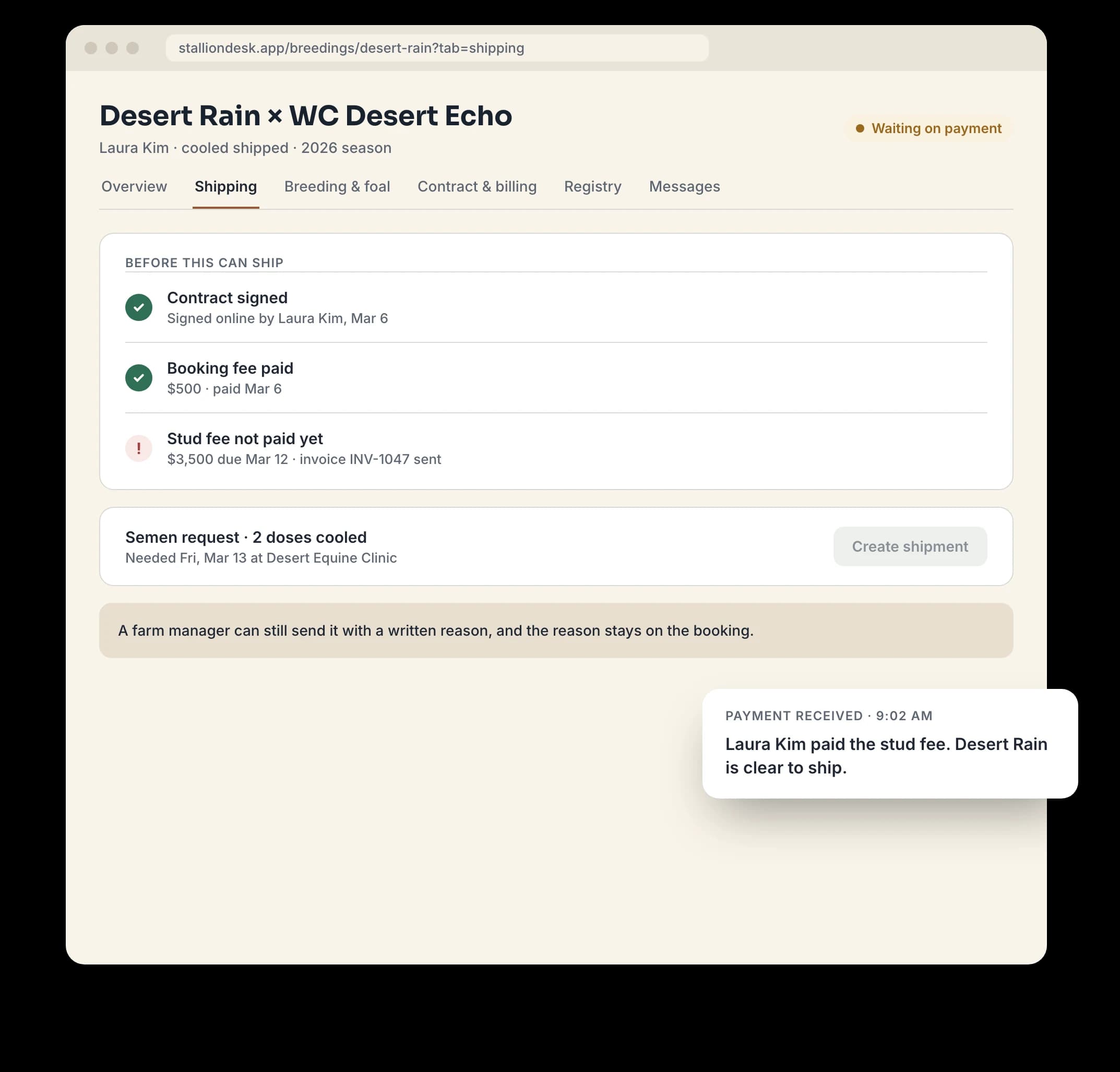
A breeding's Shipping tab: the signed contract and paid fees checked before semen can ship
  1. Step 1: Sell the breeding

    Book a mare to your stallion, or record a breeding sold at auction or privately. It stays with the buyer until a mare is assigned.

    In Breedings

  2. Step 2: Send the contract

    Terms are locked the moment the contract is created. Send it for e-signature, or mark it signed when it comes back.

    In Contracts

  3. Step 3: Take payment

    Invoice the stud and booking fees. Nothing ships until the contract is signed and those fees are paid.

    In Invoices

  4. Step 4: Take the collection request

    The mare owner sends it from your farm page, or your staff enters it. Every request is in one list.

    In Collections

  5. Step 5: Collect and ship

    Collection and shipping fees go on the breeding. Log the carrier and tracking number, and the container's return date stays in view.

    In Shipments

  6. Step 6: Pregnancy check

    The vet sends insemination dates and the pregnancy check from their link, and you approve them.

    In Breedings

  7. Step 7: Certificates

    Service and breeder's certificates, held until the balance is paid and the foal is recorded, then released.

    In Certificates

Every section

Each part of the station has its own place.

Fourteen sections, named the way the barn already talks. Here is what each one holds.

The horses

Stallions
Your standing stallions, their fees and registry eligibility. Each page shows what stops him being reported, such as no registry enrollment or an expired semen permit.
Mares
Client and resident mares, with owners, vets, DNA on file and reproductive history.
Contacts and vets
Owners, vets and everyone else you work with, with addresses and notes.

The season

Breedings
Each stallion and mare pairing for a season, from contract to foal. Most of the daily work happens here.
Contracts
Breeding contracts from draft to signature. Terms are frozen when the contract is created.
Collections
Semen requests from the first ask to a delivered container, including those from your public form.
Shipments
Containers on the road: carrier, tracking, return deadlines and owner updates.
Frozen inventory
Frozen semen batches by stallion: what is in the tank, doses left, and what runs low.

Paperwork and money

Certificates
Breeder's certificates and foal documents. Each one shows what is holding up its release.
Reports
Annual breeding reports per registry, with a check for anything the registry would reject and a CSV export.
Payments
Charges, credits and what each mare owner still owes.
Invoices
Bill stud, collection, shipping and other fees. A paid invoice prints as a receipt.

Running the farm

Dashboard
Blockers, open requests, contracts waiting on signature, shipments in transit, mares in foal, certificates ready, balance due, and anything owners or vets sent for review.
Farm Settings
Farm details, season dates, standard fees, team, your public page, integrations and registry rules.
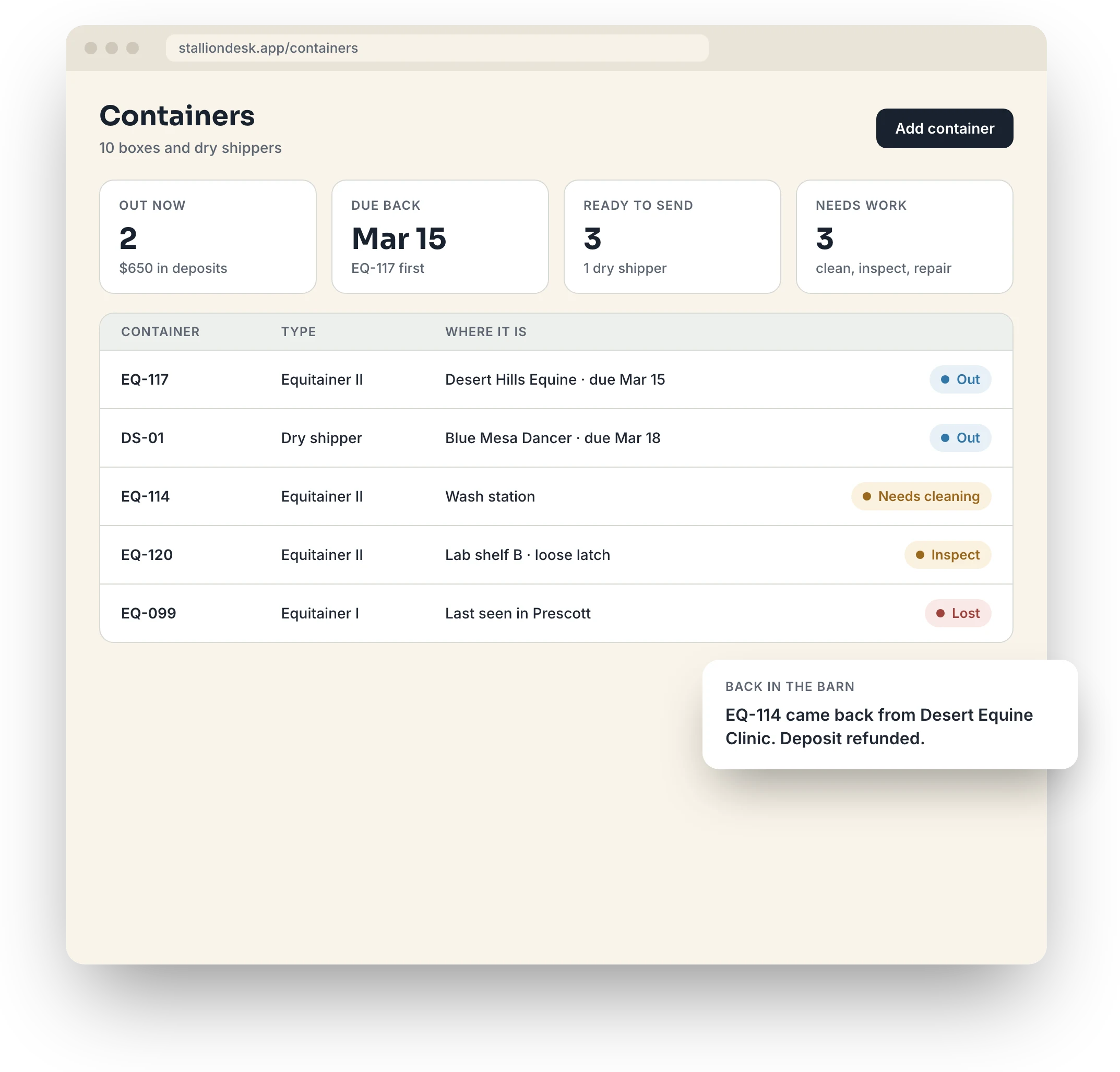
Containers: shippers out, due back and needing work, with deposits
Shipments. Carrier, tracking and when each container is due back.
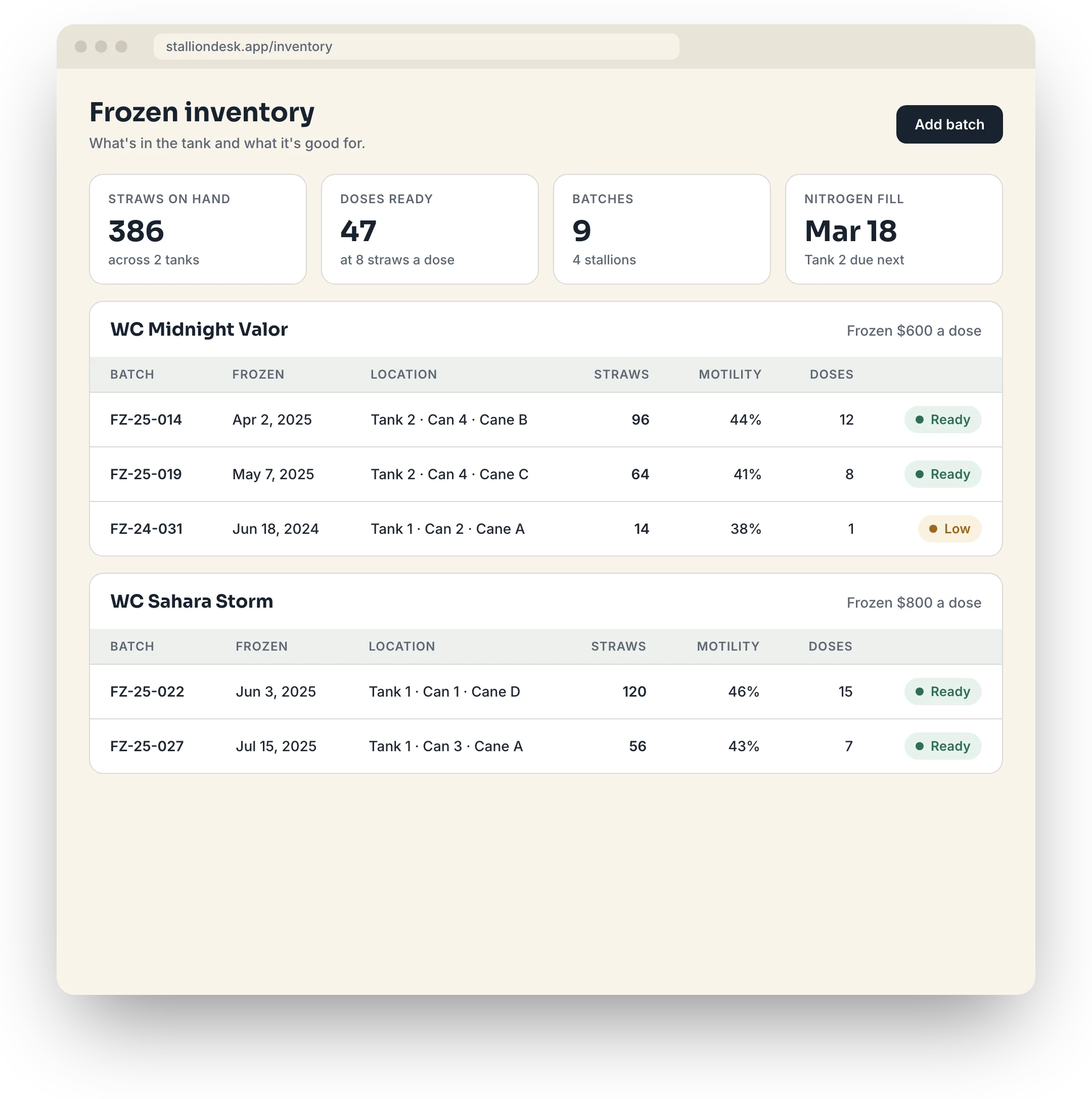
Frozen inventory: semen batches by stallion with straws and doses left
Frozen inventory. Straws and doses left per batch, flagged when a batch runs low.
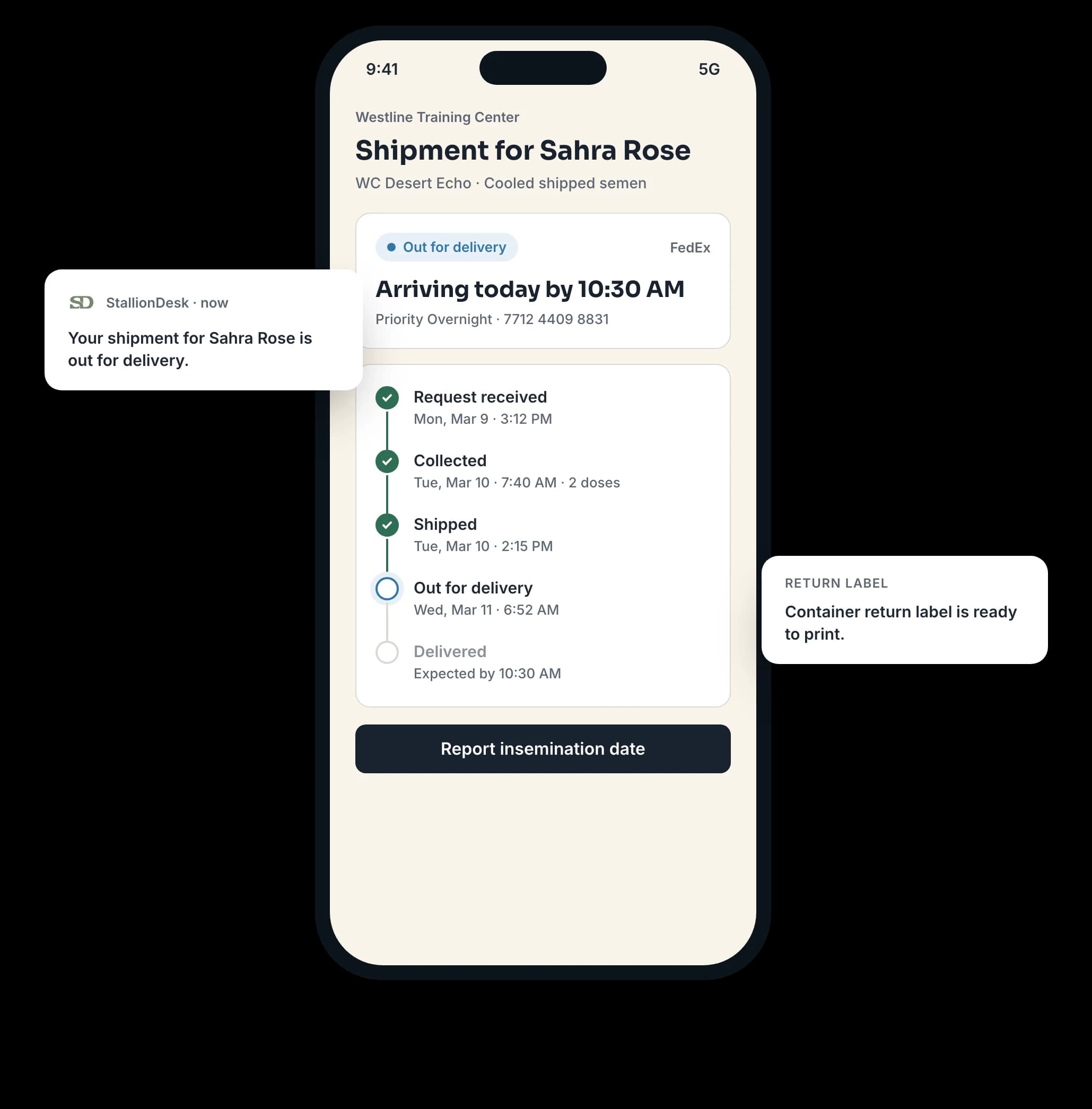
A mare owner's breeding link on a phone, with shipment tracking and balance due

No logins for clients

Each breeding has two private links, one for the owner and one for the vet. Copy it into a text, open it to see what they see, or email it. Tracking emails include it on their own.

What mare owners and vets can do from their link
From the linkMare ownerVet
Follow shipments and trackingYesYes
Send insemination datesYesYes
Send the pregnancy check resultYesYes
Send foal detailsYesNo
See charges and balance dueYesNo

Nothing counts until you approve it

Dates, pregnancy results and foal details land in Waiting for your review on the Dashboard. Approve adds them to the breeding. Reject discards them.

Link forwarded? Reset it

The old link stops working immediately. Send the new one and carry on. Each link shows one breeding only.

Fees, invoices and payments

Every fee on the breeding it belongs to.

Stud fees are set per stallion. Collection and shipping fees start from your standard fees and can be changed per stallion. The stud and booking fees are added when the breeding is created.

Balance due, worked out for you
Payment lines on each breeding track what is owed and what is paid. The balance comes from those lines.
One invoice per breeding
Bundle the open charges, edit descriptions, add your own lines, and set a due date and a note.
Bill a shipment in one step
From Shipments, invoice its collection and shipping fees together.
Paid invoices print as receipts
Voiding an invoice frees its charges to be billed again.

Charges StallionDesk knows by name

  • Stud fee
  • Booking fee
  • Collection fee
  • Shipping fee
  • Rush fee
  • Container deposit
  • Late container fee
  • Storage fee
  • Handling fee
  • Certificate fee

Plus your own lines, credits and refunds.

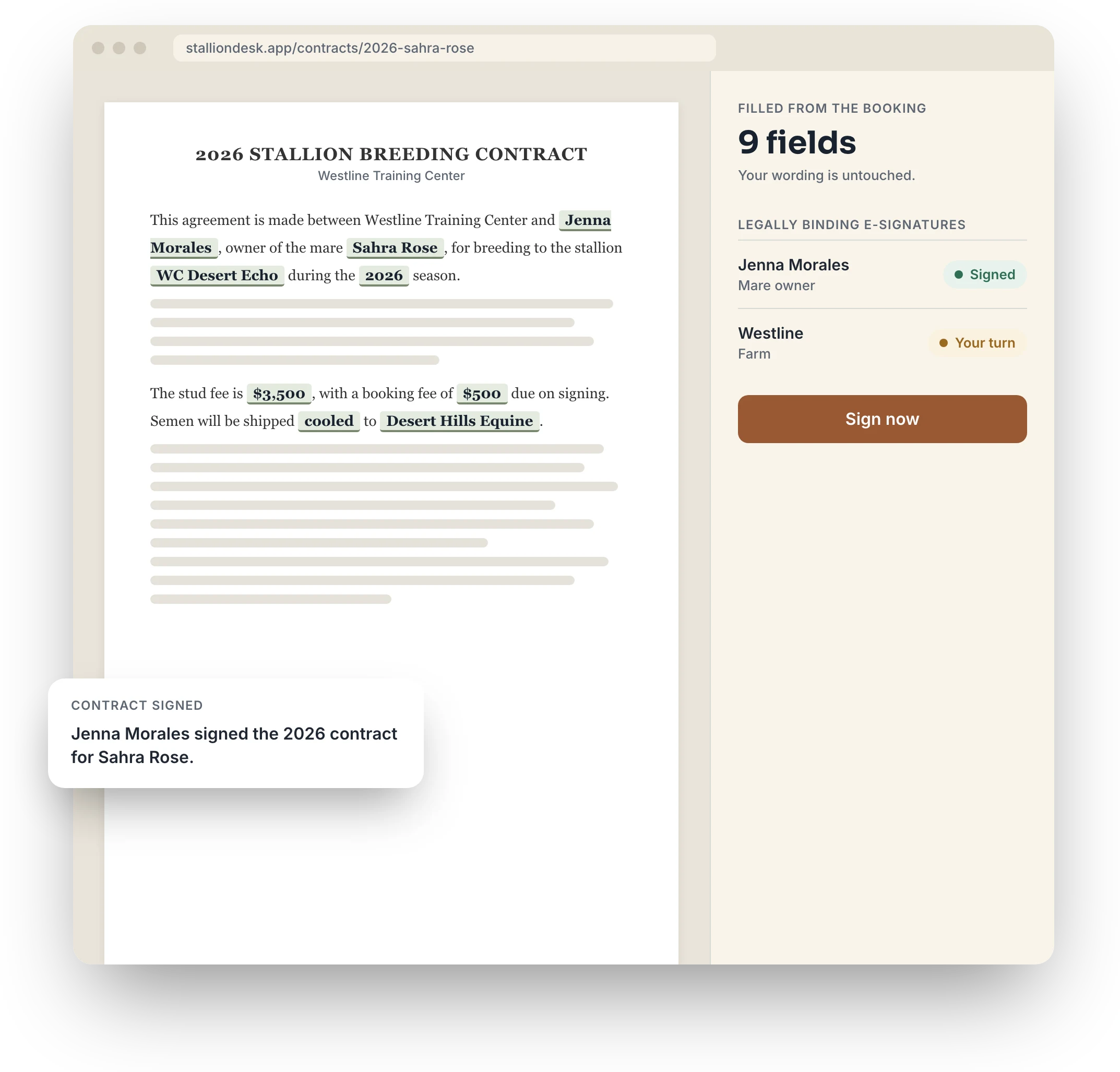
Contracts: breeding contracts from draft to signature
Contracts. Terms are frozen the moment a contract is created, so the fee you agreed is the fee you bill.

Registry paperwork

See what the registry would reject before you send anything.

Each breeding has a paperwork checklist for its registry: what is needed before breeding, before shipping and after the foal. Semen permits, transported semen certificates, embryo transfer forms and report deadlines. Items tick off from your records where they can.

Missing items are blockers. A blocked certificate cannot be released and a blocked breeding cannot be reported until it is fixed. The Dashboard totals them for the whole farm.

What holds a breeder's certificate

  • The pregnancy isn't confirmed
  • Foal details are missing
  • A balance is still due
  • The mare changed owners and needs review
  • Registry information is missing

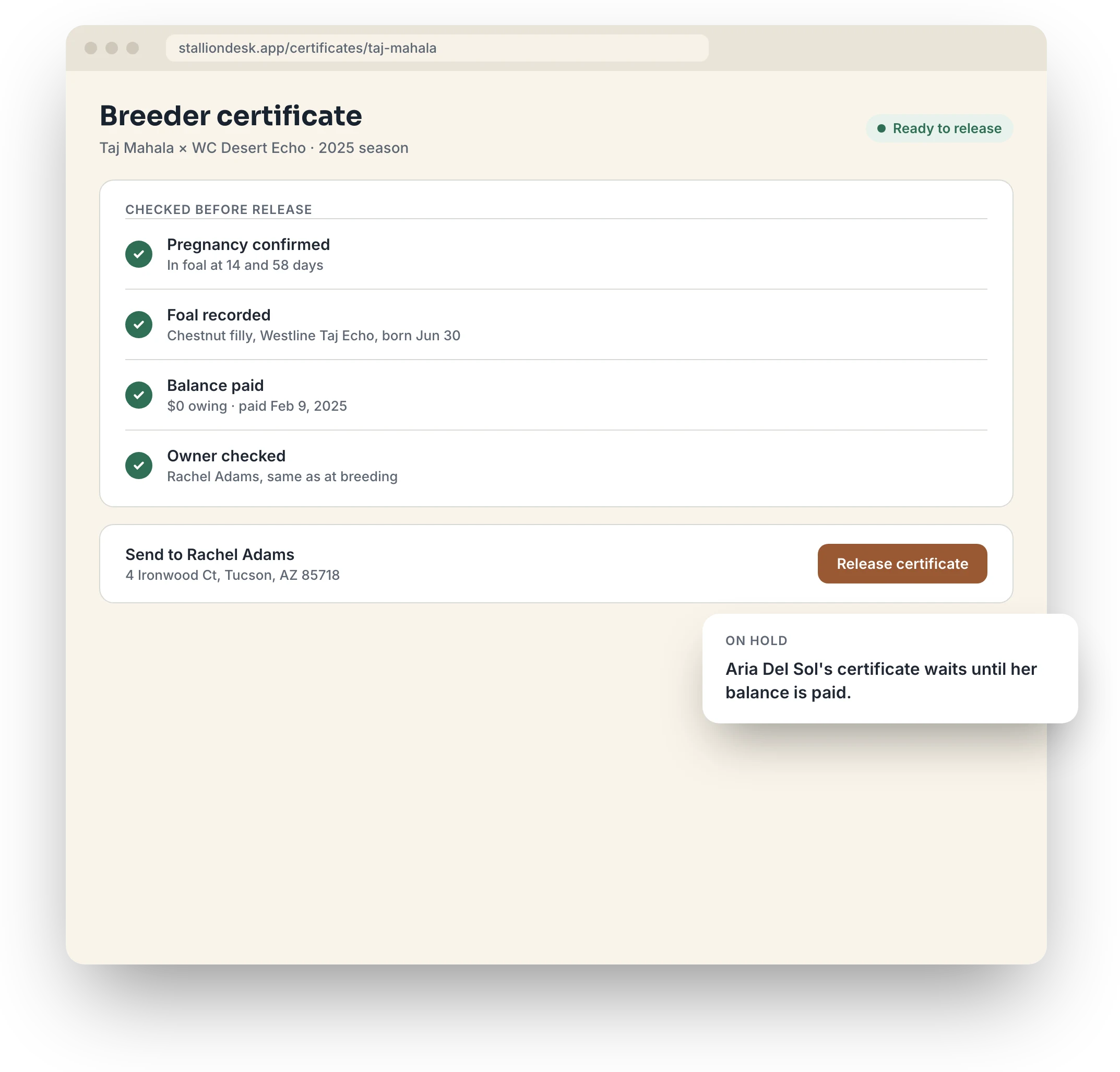
A Half-Arabian foal reported to AHA, or a Quarter Horse foal to AQHA: the certificate names the first thing in its way, and the database will not release it until that is cleared.

Certificates: breeder's certificates with what is holding each one up

The season's report, checked

Build the annual breeding report per registry, fix what it would reject, and export a CSV.

Check the rules

StallionDesk starts with fifteen registries, from AHA and AQHA to The Jockey Club. Registries change their requirements, so review each one in Farm Settings against its current rulebook. Until you do, the app marks it unverified.

Out in the world

A farm page and a semen request form, ready to share.

Both are public. Neither needs anyone to sign in.

Farm page

Your stallions, fees and contact details on one public page. Add your logo and a cover photo, pick an accent colour and heading style, write intros, reorder sections and stallions, and link your social accounts. Preview it before you publish.

Semen request form

Mare owners request semen from your form. A request for cooled semen for a mare in Scottsdale lands in Collections, and your team accepts it from there.

Integrations

Works on its own. Connects when you want it to.

Integrations are optional and set up per farm in Farm Settings. Without them, contracts are marked signed by hand and payments are recorded on each breeding.

TackleOS

Available

TackleOS runs the whole horse farm: horses, health, breeding records, shows, feed and billing. It is a separate product, sold separately. If you use both, link them and import the stallions, mares and contacts you choose.

Keep billing in StallionDesk, the default, or send stud, booking, collection and shipping fees to TackleOS as charges and invoice everything from there. Payments recorded in TackleOS come back on their own.

How StallionDesk works with TackleOS

QuickBooks Online

Send a breeding's charges to QuickBooks as an invoice, with mare owners added as customers and each kind of charge posted to the QuickBooks item you choose. Check back for payments recorded there and mark them paid here.

Nothing is sent until you click Send to QuickBooks on a breeding.

Your team

Managers and staff, each with their own sign-in.

Invite people by email from Farm Settings and choose Manager or Staff for each. Staff do the daily work. Managers also handle links, billing and settings.

What managers and staff can do
CanManagerStaff
Work with horses, breedings and shipmentsYesYes
Approve owner and vet updatesYesYes
Copy, email or reset linksYesNo
Invoices and billingYesNo
Farm settings and integrationsYesNo

Questions

What stallion managers ask first.

Do mare owners and vets need an account?

No. Each breeding has two private links, one for the owner and one for the vet. An owner who books with three farms simply has three links, each with that farm's name and colours.

Can an owner see what another owner owes?

No. Each link shows one breeding only, and vets never see money.

An owner says their link doesn't work.

It was probably reset. Open the breeding, copy the current link from the Owner and vet card and send it again.

Why didn't a date the vet sent show up on the breeding?

It is waiting for approval. Nothing an owner or vet sends counts until someone on your team approves it. Check Waiting for your review on the Dashboard.

A certificate won't release. Why?

Open it and read what is holding it up. It will be one of: the pregnancy isn't confirmed, foal details are missing, a balance is still due, the mare changed owners and needs review, or registry information is missing.

If I edit a mare later, does it change old breedings?

No. When a breeding is created, StallionDesk saves a snapshot of the mare and both owners' names and addresses. Later edits to the mare or stallion leave that breeding as it was.

Which registries does it know?

Fifteen are set up to start, including AHA, AQHA, APHA, ApHC, The Jockey Club and the American Saddlebred Horse Association. Registries change their rules, so review each one in Farm Settings against its current rulebook before you rely on it.

We already use TackleOS. Do we enter everything twice?

No. Link TackleOS from Farm Settings and bring over the stallions, mares and contacts you choose. You can also send StallionDesk's fees to TackleOS and invoice everything from there.

How do I get started?

Create an account and set up your farm yourself. Start with your season dates and standard fees, then add your stallions.

Ready before his first collection.

Book a call, tell us how you stand your stallions, and we'll set StallionDesk up with you. Owners and vets never need an account.

What we set up with you

  1. Farm Settings, Farm. Your name, contact details and season dates.

  2. Standard fees. Your usual collection, shipping and other fees. They prefill each new stallion.

  3. Registries. Check the rules for the registries you report to.

  4. Stallions. Add each stallion with his stud fee and registry enrollments.

  5. Team. Invite staff by email as a Manager or Staff.